Course Development Toolkit
Welcome to the course development toolkit!
CETL welcomes you to this toolkit and the companion Course Development Checklist (.doc) to support you in the design of intentional, high quality courses and effective learning experiences.
This toolkit was designed to serve as a guide for faculty, either working alone or with the support of a CETL Instructional Designer (ID).
We begin this toolkit by inviting you to review the instructional policies and standards that guide the course design process at NDNU.
Please note: Your program director can connect you with the syllabus template (which lists many of these policies) and can provide more policy guidance specific to your school.
Instructional policies and standards
Credit hour policy
- According to Department of Education policy 34 C.F.R. § 600.2, one credit hour consists of 15 hours of direct faculty instruction, which may include an equivalent or proportionate amount of regular and substantive interaction (RSI) in the case of distance education modalities, plus 30 hours of out-of-class work. For example, a typical three credit hour course in a 15-week term would include 45 hours of direct instruction or the RSI equivalent (three hours a week) and 90 hours of out-of-class work (six hours a week).
- The Wake Forest Student Workload Calculator may be helpful as you calculate credit hours and workload for your course.
Course modalities
The university prioritizes flexibility for adult learners through an emphasis on online and hybrid courses. Below are general definitions and advice from CETL for each course modality. Contact your school for additional guidance on expectations regarding instruction by modality.
- An online asynchronous course is a course where students engage with course materials, discussions, and assignments
on their own schedule rather than meeting at a set time. Learning is supported through
pre-recorded lectures, readings, digital activities, and weekly deadlines, allowing
flexibility while still maintaining structured deadlines and opportunities for engagement
and interaction.
CETL guide: Creating an Asynchronous Canvas Course
- An online synchronous course is a course where instructors and students meet regularly in scheduled real-time
class meetings, typically via Zoom. This format mirrors the immediacy of a traditional
classroom — facilitating live meetings, discussions, and collaborative activities
— while leveraging Canvas to support interaction and engagement outside of class.
CETL guide: Creating a Synchronous Canvas Course
- A hybrid course combines in-person class sessions with online learning activities. In this model,
a portion of instruction, interaction, and assessment occurs face-to-face, while the
rest takes place online — either synchronously or asynchronously — creating a flexible
structure that integrates the strengths of both learning environments.
CETL guide: Creating a Hybrid Canvas Course
- An in person course with Canvas is a face-to-face class where Canvas serves as a digital hub for sharing materials,
assignments, grades, communication, and supplemental learning activities.
CETL guide: Creating an In Person Canvas Course
Student-centered instruction
Our approach to instruction at NDNU is learner-centered and grounded in the NDNU Mission, Values, and Hallmarks. We see all NDNU employees, structures, and curriculum as models-in-action for the core values of the University: the whole person, the collaborative community, and the just society.
As a collaborative teaching and learning organization, NDNU:
- Commits itself to building an interdisciplinary community of learners seeking the integration of knowledge.
- Promotes active learning, self-assessment, and outcomes measurement by, between, and among students and faculty.
NDNU is a collaborative teaching and learning organization, in partnership with colleagues in a wider community. NDNU:
- Promotes community service in programs, organizations, and activities throughout the University.
- Engages in on-going experiential learning opportunities that link theory and practice.
- NDNU offers a technological infrastructure that enhances an interactive and innovative learning environment.
(Employee Handbook, 2025, pp. 5–6)
Student-centered policies and standards
The following policies and standards inform our approach to student-centered instruction.
- Student learning outcomes guide our curriculum and course design. Our commitment to learning outcomes is at the core of our approach and aligns with WSCUC guidelines in the 2023 WSCUC Handbook CFR 2.3.
- Student engagement and interaction is incorporated into online courses, both synchronous and asynchronous. We refer to U.S. Dept. of Education policy 34 C.F.R. § 600.2 for definitions of “academic engagement” and “regular and substantive interaction” (RSI).
- Courses are accessible to all students according to Americans with Disabilities Act (ADA) requirements for accessibility: Section 504, Rehabilitation Act of 1973; Americans with Disabilities Act of 1990, as amended and Title II; and WCAG 2.1 Level AA standards.
- CAST's Universal Design for Learning (UDL) Guidelines help us design courses where every student can thrive. UDL starts from a simple premise: learner variability is the norm and courses can be designed for the success of all students through multiple means of engagement, representation, and action and expression. Version 3.0 adds a stronger focus on learner agency, identity, and belonging and provides specific guidance on how to apply UDL principles through flexible materials, meaningful choices, and inclusive assessments, to ensure access and rigor go hand in hand.
- Quality Matters standards help ensure the overall quality of our student-centered courses. Quality Matters (QM) Higher Ed Standards for course design, as identified in the “QM Higher Education Rubric (Seventh Edition),” are used to guide and inform quality review of our online and blended courses. Please note we identify specific QM standards throughout the guide that follows to underscore these quality connections.
AI policy
“NDNU believes that academic institutions should provide students with appropriate guidelines and training to make informed decisions on how to ethically integrate AI into their work products and assignments. Our Academic Integrity policy expects students to produce original work when required and to cite supporting documents, resources, and tools as appropriate per APA guidelines – the requirement to cite supporting documents, resources, and tools includes AI tools.
Each course instructor will determine how AI language models may be used in their course. This may range from allowing AI tools in assignments as long as the student cites the information or ideas synthesized, limiting the use of AI tools to specific assignments, limiting the use of AI only as a starting point for what will be the student’s own analyses and critical thinking, or not allowing AI tools at all. Students who have doubts about the appropriate use of an online learning support platform in their course should discuss their situation with their instructor.”
See NDNU Student Handbook, 2024–2025, p. 13.
Faculty are encouraged to consult with their program leadership for more guidance regarding the AI syllabus statement and policy for your program.
To begin the deep work of quality course design, we recommend you run a careful analysis of the situational context and stakeholder needs as described in this section.
Needs assessment
A course needs assessment includes an initial review of course materials and your approach to teaching, including your syllabus (if it already exists), the context of your course within the program, your teaching context, your learners, and your unique vision as an instructor.
“Situational factors” and related questions that will shape the kick-off meeting discussion and course design process include:
- General context of the teaching and learning situation. What learning expectations are placed on this course or curriculum by the university,
school or division, or professional association? How does your course fit within a
program plan? What is the mastery level expected for your course?
Note: At NDNU each school and program has its own learning outcomes and assessment plan. Communicate with your school or program leadership to confirm existing Course Learning Outcomes (CLOs) and to clarify expectations regarding assessment of Program Learning Outcomes (PLOs) within the course.
- Specific context of the teaching and learning situation. How many students do you expect in the class, in the short term and longer term? How will the course be delivered: online asynchronous, online synchronous, hybrid, or in person?
- Nature of the subject. Is this subject primarily theoretical, practical, or a combination? Is the subject primarily convergent or divergent? Are there important changes or controversies occurring within the field? What are the real-world applications?
- Characteristics of the learners. What is the life situation of the learners — working, family, professional goals? What prior knowledge, experiences, and initial feelings do students usually have about this subject? What are their learning goals and expectations?
- Characteristics of the instructor. What do you love most about your course? What beliefs and values guide your approach to teaching and learning? What is your attitude toward the subject, and toward students? What level of knowledge or familiarity do you have with this subject? What are your strengths in teaching?
Backward design is a research-based approach to course design that we use to achieve student-focused, integrated, and effective courses. Course design or redesign using backward design can be time-consuming and challenging — your Instructional Designer is ready to support you in the process, in mapping your course design, and in advising on the use of GenAI tools.
Backward design
A content-first or “forward design” is what many of us are most used to — you were a student in those courses and you may teach them as well. They start with a list of topics, often based on textbook chapters, and work through them over the semester focusing on covering the content. Rather than starting with textbooks, lectures, or activities, backward design begins with student learning outcomes and competencies: what should students know, be able to do, or value by the end of the course, or even years later? With backward design you start from your big vision for student learning to determine the assessments that will provide evidence of student achievement, and only then select the instructional materials and plan the learning activities to support those goals.
In Understanding by Design (2005), G. Wiggins and J. McTighe first described the three steps of backward design:
- Identify desired results. What should students know and be able to do at the end of the course? What do you want students to learn and remember, even years after the course is over? These are your learning outcomes.
- Determine acceptable evidence that students have achieved these learning outcomes. How will students — and the teacher — know if they are learning? These are your formative and summative assessments.
- Plan learning experiences, instruction, content, and resources that will help students provide evidence that they have met the learning outcomes. What will the teacher and students need to do for students to learn? This is where you design student engagement with content in order to achieve the learning outcomes.
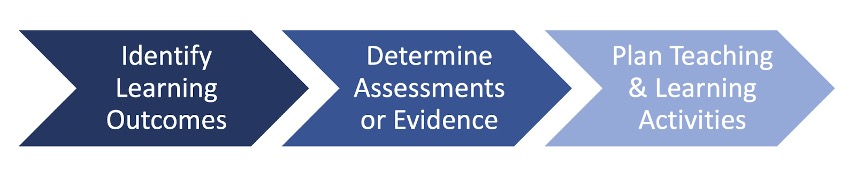
In Creating Significant Learning Experiences (2013), L. D. Fink expanded and deepened the original backward design model — popularized by Wiggins and McTighe — by incorporating a broader, more integrated vision of learning that emphasizes transformative outcomes.
Why design backward
Backward design helps avoid the pitfall of “content coverage” teaching, where too much focus is on content delivery without enough clarity of purpose. The backward design approach begins with your vision for student learning rather than content, to ensure intentional alignment between learning outcomes, assessments, and instruction. Research shows that backward design helps create courses that are coherent, student-centered, and effective in fostering deep and lasting learning, creating a clear and purposeful learning pathway for students.
- Fulmer, Sarah. Research support for backward design (PDF)
How to design backward
To start backward design, reflect on your big vision for student learning. It can help to imagine running into a former student years after taking your course, who shares with you how your course impacted them. What would you most want a former student to remember about their learning in your course even years later? Your answer can serve as a powerful guide in the backward design process, helping you identify and prioritize “enduring understandings,” and design an impactful course.
Course mapping using a table or other visualization tool is a useful starting point to translate your big vision for student learning into a concrete and aligned course design plan. An ID can support you in mapping your course and ensuring alignment in course design to create an integrated and transparent plan for student learning.
- The UCI-UCSD Online Course Mapping Guide provides excellent resources to guide thinking about course design and redesign and the process of mapping a course, including a template.
Learning outcomes
Student learning outcomes (SLOs) are the clear, specific, observable, and measurable statements of what students should know, be able to do, or demonstrate as a result of a learning experience. Learning outcomes are essential to making your expectations clear to your students, so students know how they should spend their time practicing and studying to achieve success. When outcomes are clear and aligned with assessments and learning activities, students experience a coherent pathway where every experience clearly contributes to achieving meaningful and measurable goals.
Learning outcomes are the formal expression of intentions for student learning at multiple levels. Program-level outcomes (PLOs) define the broad competencies graduates should achieve and at what level of mastery. Course-level outcomes (CLOs) specify the knowledge and skills to be gained in a single course and at what level of mastery. Weekly or module-level outcomes (WLOs/MLOs) narrow the focus of learning competencies to a unit or topic each week. Assignment-level outcomes articulate the learning targeted by a specific task. Alignment of learning outcomes across all levels ensures that each outcome builds from smaller toward larger educational goals.
Quality learning outcomes are specific, observable, measurable, and aligned with the level of learning expected. At the course level, CLOs are typically structured as: “By the end of the course, students will be able to… [verb] + [object].” Strong learning outcomes avoid vague language (“understand,” “learn”) and instead emphasize student action and demonstration of skills or knowledge, informed by verbs selected intentionally. Although Bloom’s revised taxonomy is the most popular, consider also Fink and Marzano & Kendall taxonomies.
- Bloom’s Revised Taxonomy of learning objectives is the most popular taxonomy. Bloom’s taxonomy guides us in choosing verbs to convey the levels of cognitive challenge we hope to elicit: from lower-order thinking outcomes (remember, understand) to higher-order thinking outcomes (apply, analyze, evaluate, create).
- Fink’s Taxonomy of Significant Learning is another popular taxonomy that can help articulate learning outcomes using a more holistic and interactive framework.
- Marzano & Kendall, Taxonomy of Educational Objectives categorizes learning as part of three systems — cognitive, metacognitive, and self — and identifies learning verbs associated with each.
QM rubric 2.1–2.5
Assessments
Assessment is the process of gathering evidence about student learning to evaluate progress, provide feedback, and guide instructional decisions to achieve your vision for student learning. Assessments serve students, instructors, and programs by making learning visible and informing improvement.
Formative assessment occurs during the learning process — quizzes, drafts, reflections, or in-class activities — and provides timely feedback that helps students adjust and instructors refine instruction. Many learning activities, discussed in the next section, may also serve as formative assessments. Summative assessment takes place at the end of a learning period, such as final projects, exams, or capstone experiences, and is used to judge the extent to which learning outcomes have been achieved.
Note: This toolkit is focused on course-level assessment. We encourage you to work with your school or program to plan assessment of PLOs as applicable to your course.
Tips on effective assessment and assignment design:
- Start with alignment: assessments should directly measure stated learning outcomes and match the level of knowledge or skill expected.
- Be transparent with students about the purpose of each assessment, how it connects to their overall learning goals, and criteria for success.
- Use a variety of assessments to give students multiple ways to demonstrate learning, and include some choice when possible and appropriate to the learning outcome.
- Aim for authentic assessments: tasks that closely mirror real-world problem-solving, critical thinking, reflection, and creativity — projects, case studies, simulations, or portfolios — preparing students to succeed beyond the classroom.
- Integrate opportunities for revision and reflection as part of assessment: help students apply feedback to improve and develop metacognition.
- Scaffold assessments so students can benefit from iterative feedback and better track their progress through the course. This often includes frequent, smaller opportunities for formative assessment. For larger summative projects, such as a final group project, this involves turning in the project in smaller stages throughout the course.
CETL handout: Guidelines on Effective Assessment Strategies
QM rubric 3.1–3.6
Learning materials
From a backward design perspective, learning materials do not drive design. Faculty choose and create materials in a purposeful way to help students build the knowledge and skills needed to achieve the learning outcomes. Aim for student-friendly choices by selecting learning materials that are engaging, accessible, up to date, varied, and affordable. As you select materials, be sure to model academic integrity by citing sources and making sure you have permission to use them.
Find support in identifying quality materials at Gellert Library.
QM rubric 4.1–4.5
Learning activities and interactivity
Design of learning activities and interaction should also focus on advancing students toward your vision for student learning as stated in your outcomes. When thoughtfully designed, online activities and interactions not only improve student success on assessments, they help foster student motivation and a sense of belonging that helps all students persevere and succeed.
Design multiple and varied active learning opportunities
Incorporate multiple and varied active and interactive learning opportunities that are aligned with your outcomes and assessments. For ideas and examples see:
- Active Learning Library
- Collaborative Activities for Online Learning
- Cross Academy Techniques Video Library
- CETL handout: Collaborative Learning Techniques
Apply the Community of Inquiry (CoI) model
Apply the Community of Inquiry (CoI) model (Garrison, Anderson, & Archer, 2000) to design three “presences” in your course in support of learning, student engagement, and community:
- Teaching presence involves organizing content, guiding activities, and offering timely feedback to create a clear and supportive structure.
- Social presence encourages students to express themselves, build trust, and feel part of a learning community.
- Cognitive presence focuses on helping students engage deeply with ideas through inquiry, reflection, and application.
See Costa handout: COI Online Teaching Checklist
Design for Regular and Substantive Interaction (RSI)
RSI aligns with the CoI model to support learning, student engagement, and community, and meets the policy baseline for online courses. RSI encourages faculty to design three forms of interaction into every online course:
- Student-to-instructor interaction: regular announcements, timely and constructive feedback on assignments, participation in discussion boards, video messages, virtual office hours.
- Student-to-student interaction: group projects, peer review, discussion boards, student video presentations, study groups on Zoom.
- Student-to-content interaction: engaging content presented in a variety of formats, quizzes that provide instant feedback on student comprehension, and authentic assignments with real-world relevance and application.
See CETL handout: Regular and Substantive Interaction Guidelines
QM rubric 5.1–5.4
GenAI tools and course design
Generative AI tools can be used to support your course design in many ways. Discuss options with an Instructional Designer.
A well-structured Canvas course is clear, consistent, and easy to navigate, reducing cognitive load so students can focus on learning. Effective Canvas design also includes student-centered instructional practices such as active and interactive learning, learner support, engaging use of technology, and accessible design.
Planning course structure
When planning your course, think of the Canvas structure as the backbone that supports student learning from start to finish. An intuitive, well-organized course frees learners to focus on understanding, not navigation.
- Map out the sequence of topics by week or module before building in Canvas to ensure a logical flow and progression of learning.
- Begin with a welcoming orientation module and end with reflection or synthesis activities that tie learning outcomes together.
- Structure modules for clarity with descriptive titles and headings and aligned materials and activities.
- Keep a consistent pattern in each module — overview, readings, activities, assessment — to support predictability.
- Review pacing regularly to confirm that students have adequate time to engage and demonstrate learning.
- Periodically preview your course from the student view to confirm clarity and ease of navigation.
Canvas considerations
The Canvas template shared with you by an ID should help inform an effective design. See the Canvas Instructor Guide for additional guidance on Canvas tools in support of the following.
- Home page: Provide a course overview and introduction to the course from a designated course home page.
- Getting Started: Provide an orientation or “Getting Started” module with course expectations, technology guidance, and support resources to set students up for success.
- Introductions: Introduce yourself and give learners the opportunity to introduce themselves or participate in an icebreaker activity on a discussion board.
- Module organization: Use a logical and consistent structure for modules, chunking content into manageable segments with descriptive titles so students immediately understand their purpose. Consider using text headers to clarify expectations regarding asynchronous (pre- and post-class work) and synchronous learning (in class), if applicable.
- Communication tools: Plan how you will use Announcements for whole-class or whole-section mass communication and Inbox for messaging one, multiple, or all students in a class. See also the CETL handout for help setting up Canvas Notifications.
- Content delivery tools: Along with texts and readings you can embed multimedia content including websites, PowerPoint slides with narration, videos (with captions), and images (with alt text) for a more engaging course using the Rich Content Editor (RCE). Videos are especially valuable learning materials in online courses, and Canvas Studio supports video creation and streaming.
- Grading and feedback tools: Set up all Canvas grading criteria and assignments to convey clear, transparent, and fair grading standards aligned with your syllabus. Consider your grading and feedback strategy, including how you will use Quizzes, SpeedGrader, Rubrics, and the Gradebook to communicate grades and feedback to students.
- Outcomes tracking tools: Some schools and divisions may be using outcomes tracking at the programmatic level with the Learning Mastery Gradebook and Mastery Paths.
- Collaborative learning tools: Canvas includes a number of tools to support student collaboration. For a list of tools and possible uses see CETL Guide: Canvas Collaboration Tools.
- Usability considerations: As you build your course, aim for simple design and avoid clutter by deleting unnecessary content or tools, minimizing clicks, and validating all links. Be sure to review the entire course from start to finish from the student view to confirm easy navigation and usability.
QM rubric 1.1–1.9 and 8.1
Course multimedia and third-party tools
Integrating multimedia is a great way to enrich student engagement and interactivity in a course. Two powerful multimedia tools currently available within Canvas are:
- Canvas Studio for video recording and streaming, used for delivering video lectures and multimedia assignments.
- Lucid (Whiteboard) for a variety of uses including interactive lectures, brainstorming, collaborative project planning, and visual assignments.
AI tools are increasingly being used within assignments and assessments in responsible and ethical ways to support learning. For example, see Unlocking Human-AI Potential: 10 Best Practices for AI Assignments in Higher Ed from ACUE.
In your choice of multimedia and technologies, prioritize learning outcomes as well as usability and ADA compliance. Before using a third-party technology, review the vendor’s accessibility statement to confirm access for all users.
QM rubric 6.1–6.4
Learner support
Learner support resources are built into the Canvas templates created by CETL and shared with faculty. It helps students when faculty encourage learners to find support as needed at the start of the semester and remind them throughout. We recommend you familiarize yourself with The Student’s Guide to NDNU and the Academic Success Center Canvas course as essential student resources.
QM rubric 7.1–7.4
Accessibility and Universal Design for Learning (UDL)
Accessibility as defined by the Americans with Disabilities Act (ADA) ensures that all learners, including those with disabilities, can access course materials and technologies.
For policy and guidance on accessibility, see our resources on Accessible Digital Content.
Universal Design for Learning (UDL) supports accessibility through the basic idea that all learners, including those with disabilities, benefit from autonomy, flexibility, and choice in how they learn. UDL encourages us to design for students with diverse learning preferences and abilities by providing:
- Multiple ways for learners to engage in learning. For example, encouraging a sense of identity and belonging in your class.
- Multiple ways for students to demonstrate their learning. For example, giving students choice on how to complete assignments — alone or in groups, in different modalities.
- Multiple ways for students to access content. For example, sharing engaging readings along with videos and podcasts.
For guidance on UDL see the CAST website on The UDL Guidelines (3.0).
QM rubric 8.1–8.5
GenAI tools and course development
Generative AI tools can support course development in a variety of ways. Discuss options related to Gen AI tools and course development with an Instructional Designer.
Reviewing a new course? Once the course is built out in Canvas, it is ready for a full quality review before publication.
Refreshing an existing course for a new term? Refer to the Start-of-Term Checklist to guide a basic review/refresh for the new term.
New course quality review
- Review instructional policies and confirm the course meets standards for credit hours, student engagement and interaction (RSI), and accessibility (ADA compliance).
- Review the course using QM review standards, or request review support from your CETL ID or program.
- Publish the finalized course at least one week before the term begins with home page, syllabus, and Getting Started module.
Note: You do not have to share everything at the start of the semester — just what you want students to see. In Canvas, if content is unpublished or a module is locked, students cannot see it. If uncertain, use Student View to confirm.
Prepare an existing course for a new term
For all courses, review the Start of Term Checklist to guide your updates, so the course is published at least one week in advance of the term with a minimum of a home page, syllabus, and Getting Started module.
Each semester we recommend you review instructional policies and standards and ensure the existing course is in alignment with credit hours, student engagement and interaction (RSI), accessibility (ADA compliance), and QM quality standards. Seek support from CETL in any of these areas as time permits.
GenAI tools and course review
Generative AI tools can be used to support your course review in many ways. Discuss options with an Instructional Designer.
Instruction is most effective when instructors maintain presence and foster student engagement throughout the semester, through active and interactive learning, regular communication, and effective feedback practices. A continuous improvement approach supports faculty development and iterative course development.
The course delivery phase assumes active facilitation by the instructor, as planned for in the Course Build phase of this toolkit. The following are suggested practices for supporting student success through communication, feedback, and continuous improvement.
Communication practices
Frequent and transparent communication with students is essential to build community and trust, and to help students successfully navigate the course and their learning.
- Regularly communicate information about the course, assessments, technology use, support, and resources using Announcements and Inbox tools.
- At the start of the semester, send a welcome announcement or email to students with
your Zoom link, for synchronous online courses.
Note: Announcement and Inbox notifications will not be sent if the course is not published. Publish the course before sending the communication to make sure students receive the notification, or email students directly outside of Canvas.
- Early in the semester, share your expectations around how students should interact with faculty, peers, and course technology.
- Throughout the semester, send weekly announcements or emails with upcoming module information, due dates, and other essential information.
- Regularly engage with student discussion forums and student groups.
- Regularly schedule virtual office hours to check in with students one-on-one and as groups.
Feedback practices
Grading and feedback is an opportunity for communication about content and your expectations for learning, and plays a critical role in helping learners stay on track, accountable, and engaged.
- Identify key points in the course where students must receive some form of feedback to move forward with their learning.
- Use Canvas features to support grading and feedback, including Rubrics, Peer Review, SpeedGrader, audio and video feedback options, and the Gradebook.
- For general advice on giving feedback see our CETL handout: Qualities of Effective Feedback.
- Use Canvas Course Analytics to monitor student progress and engagement, and intervene when necessary by reaching out to students who may be struggling.
- Submit final grades via the NDNU portal (not Canvas).
Continuous improvement practices
- Keep a teaching journal or course revision log to document and support reflection and continuous improvement.
- Use Canvas Course Analytics and student performance data to inform your teaching.
- Invite student feedback on the course and student reflections on learning to inform
your teaching.
For advice on using surveys to invite student feedback see our CETL handout: Inviting Student Feedback.
- Encourage students to complete the NDNU course evaluations at the end of term, and use student feedback to inform your teaching.
GenAI tools to enhance instruction
Generative AI tools can support and enrich instruction in a variety of ways. Discuss options for using AI for course delivery, including student engagement, with an Instructional Designer.